

Any successful lead gen for PPC campaign starts long before you write a single ad in the Google Ads interface. It's about laying a solid foundation. If you just jump in chasing clicks, you'll burn through your budget fast. A smart strategy is what separates the campaigns that fizzle out from the ones that consistently deliver high-quality prospects through the Google Ads ecosystem.
Building Your Google Ads Foundation for Leads
Before you even think about keywords or ad copy, you need a blueprint. A winning Google Ads campaign is built on clarity, not guesswork. That means getting crystal clear on your goals and sizing up the competition. Without this groundwork, you're just flying blind, and that’s a surefire way to waste money on clicks that go nowhere.
This planning stage is absolutely essential. The global market for lead generation solutions is expected to balloon to $21.43 billion by 2033. This isn't surprising when you consider that generating leads is the top priority for 91% of marketers around the globe. You can dig into more stats about the importance of lead generation on seoprofy.com.
Define What a "High-Quality Lead" Actually Is
First things first: what does a "lead" actually mean to your business? This seems obvious, but it’s where most campaigns go wrong. A vague goal like "get more leads" is a recipe for disaster, leaving your sales team buried under a pile of unqualified inquiries from your Google Ads.
You have to get specific. Is your ideal lead:
- Someone filling out a "Request a Demo" form for your SaaS?
- A homeowner submitting a detailed "Get a Quote" form for a big project?
- A prospect downloading a whitepaper, signaling they're just starting their research?
- An urgent phone call from a landing page for an emergency service?
Each of these actions has a different value and shows a different level of intent. When you define this upfront, you can build your entire campaign—from the ad copy to the landing page—to attract exactly the right person.
A "high-quality lead" isn't just another form submission. It's a real person who fits your ideal customer profile and has a problem you can actually solve.
Set a Realistic Target Cost Per Lead
Once you know what a good lead looks like, you need to figure out what you're willing to pay for one. This is your target Cost Per Lead (CPL), and it's what keeps your Google Ads campaigns profitable. Don't just pull a number out of thin air.
Here’s a practical example. A remodeling company knows that 1 out of every 10 qualified leads turns into a customer. Their average project is worth $20,000, with a 25% profit margin—that's $5,000 in profit.
Clearly, they can't spend anywhere near $5,000 to get that customer. They might set a target CPL of $150. This means they'd spend $1,500 to get those 10 leads, one of which results in a $5,000 profit. This simple math gives them a clear benchmark to measure success within the Google Ads platform.
Analyze Your Competitors' Playbook
You’re not advertising in a vacuum. Your competitors are already on Google Ads, and you can learn a ton by watching them. This isn't about copying what they do; it's about finding their weak spots and uncovering opportunities.
Use tools like the Google Ads Transparency Center or other platforms to see the exact ads your competitors are running. Pay close attention to:
- Their messaging: What unique benefits are they promising in their headlines?
- Their offers: Are they pushing a free trial, a demo, or a direct consultation?
- Their landing pages: Click their ads. Is their page clean and fast? Is the form too long? Do they use testimonials or case studies to build trust?
This intel is gold. Maybe their ad copy is boring, or their landing page is a cluttered mess. Those are the gaps you can exploit with a better message and a smoother user experience, giving you an edge right from the start.
Finding Your Ideal Customers in Google Ads
Okay, so you've got your strategy mapped out. Now for the fun part: finding the right people to show your ads to. This is where the magic really happens in a PPC lead gen campaign. If you just throw your budget at broad, obvious keywords, you're going to burn through cash fast with very little to show for it.
The whole game is about precision. You need to reach the right person at the exact moment they're looking for what you sell. It’s less about casting a wide net and more about using a laser pointer. This means getting smart with your keywords and using Google's powerful audience signals to zero in on your ideal customer.
Uncover High-Intent Keywords That Signal Action
Let's be honest, broad keywords like "CRM software" are a money pit. They’re expensive, super competitive, and attract everyone from college students writing a paper to your competitors snooping on your ads. The real gold is in long-tail keywords. These are the longer, more specific phrases that tell you exactly what a searcher wants.
Think about the user journey on Google Search. It’s a huge difference in mindset:
- Searching "what is CRM" means they're just starting to learn.
- Searching "best CRM for small sales teams" means they're actively shopping around.
- Searching "HubSpot vs Salesforce pricing comparison" means they've got their wallet out and are ready to buy.
That last group is who you want to spend your money on. You can find these high-intent phrases using tools like Google Keyword Planner or my personal favorite, just looking at the "People also ask" box on Google. Those questions are exactly what your potential customers are typing in.
Build a Powerful Negative Keyword List
Telling Google who not to show your ads to is just as crucial as telling it who to target. A solid negative keyword list is your best defense against wasted ad spend. It stops your ads from showing up for searches that are completely irrelevant to your business.
For example, if you're a high-end kitchen remodeler, you’d want to add negative keywords like:
- free
- DIY
- cheap
- jobs
- training
Someone searching for "DIY kitchen remodel jobs" is definitely not your customer. I make it a habit to check the Search Terms report in Google Ads every single week to find new junk terms to add to my negative list. It's a simple maintenance task that can instantly improve lead quality and slash your Cost Per Lead.
Your negative keyword list is your campaign's first line of defense against irrelevant clicks. A well-maintained list ensures your budget is spent only on prospects who are genuinely interested in what you offer.
Layer in Google's Powerful Audience Signals
Keywords tell you what someone is searching for, but audiences tell you who they are. This is where you can get incredibly precise within the Google Ads ecosystem. By layering audience signals on top of your keyword targeting, you can make sure you’re only talking to people who fit your ideal customer profile.
For lead generation, I've found two audience types to be absolute game-changers:
- In-Market Audiences: Google is pretty good at figuring out who is actively shopping for specific things. You can target people who are "In-Market for Business Financial Services" or "In-Market for Home Improvement." These people are in buy mode, right now.
- Affinity Audiences: These are broader groups based on long-term interests, like "Cooking Enthusiasts." They’re not as laser-focused as In-Market audiences but can be great for building awareness if you have the budget.
Here’s how this works in the real world. Imagine you're a B2B software company. You could run a campaign targeting people searching for "CRM software pricing" AND who are also in the "In-Market for CRM Software" audience. This two-layer approach ensures you’re only paying for clicks from people who are serious about buying a CRM, making every dollar you spend that much more effective.
Crafting Ads and Landing Pages That Actually Convert
A killer keyword strategy is a great start, but it's only half the battle. If your ad doesn't grab attention or your landing page is a confusing mess, all those expensive, high-intent clicks will just evaporate. The real magic in PPC lead generation happens when you create a smooth, persuasive path from the search results page right to that "submit" button.
It all comes down to connecting with a user's problem through your ad copy and then making it incredibly easy for them to convert on your landing page. This is where your targeting efforts turn into real, measurable results.
Writing Ad Copy That Begs to Be Clicked
Think of your Google Ad as your first impression. On a crowded search page, you have a split second to convince someone you have exactly what they need. Don't just list features—talk about the outcomes and the value you deliver.
A simple but powerful headline formula I've seen work time and again is [Benefit] + [Feature] + [Credibility]. For example, instead of a generic headline like "CRM Software for Sales Teams," try something like, "Close More Deals with Our Easy CRM | Trusted by 10,000+ Businesses." See the difference? It immediately hits on a core benefit, names the product, and throws in some powerful social proof.
Carry that value-first mindset into your descriptions.
- Hit on a pain point: "Tired of tracking leads in spreadsheets? Our CRM automates follow-ups so you don't have to."
- Give a clear call to action (CTA): Use direct, action-focused language. "Get a Free Demo Today," "Request Your Custom Quote," or "Download the Guide Now" all work great.
- Use ad assets: Sitelinks can direct users to different service pages, price extensions add transparency, and image extensions make your ad pop visually.
The Big Decision: Google Lead Form Extensions vs. Landing Pages
So, where do you send people after they click? In the world of Google Ads, you've got two main choices, and the right one really depends on your campaign goals and where your audience is browsing from.
This simple decision tree helps visualize how your goals should dictate your strategy.
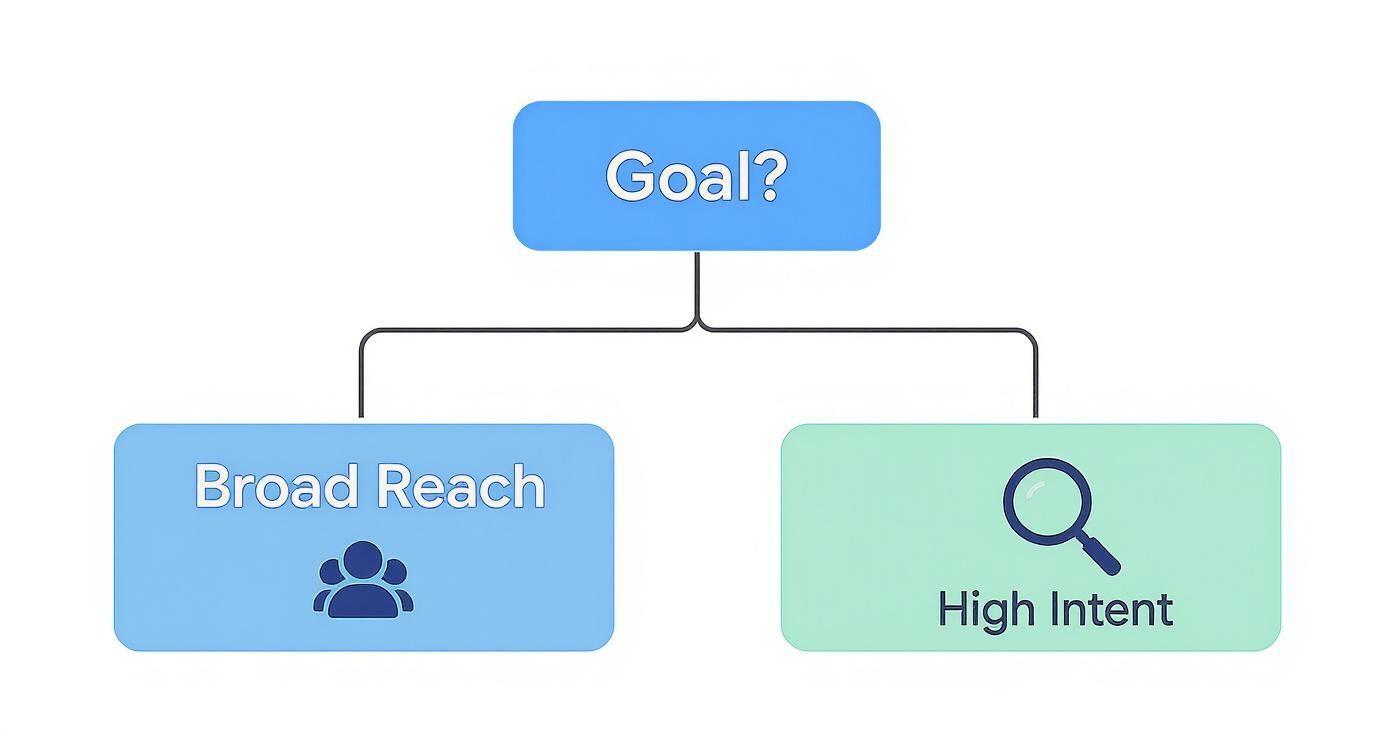
Essentially, you want to match your lead capture method to your user's intent. Simpler forms are great for broader audiences, while more detailed pages are better for high-intent searches.
Let's break down how these two options stack up against each other.
Lead Form Extensions vs Dedicated Landing Pages
Choosing between a quick, in-platform form and a custom-built page can feel tricky. Here’s a side-by-side comparison to make the decision easier based on what you’re trying to achieve.
| Feature | Google Ads Lead Form Extensions | Dedicated Landing Pages |
|---|---|---|
| User Experience | Super fast and mobile-friendly. The form lives inside Google's interface and often pre-fills user data. | Takes users to your site. This can mean slower load times, but you get a fully branded experience. |
| Lead Quality | Tends to be lower. The ease of submission can sometimes lead to less qualified or less engaged leads. | Generally much higher quality. Users invest more effort and have more context before converting. |
| Customization | Very limited. You can tweak the form fields and add a background image, but that’s about it. | Completely customizable. You have full control over the design, copy, images, video, and layout. |
| Best For | High-volume, low-friction goals like newsletter sign-ups or simple inquiries, especially on mobile. | Complex or high-value offers, like B2B software demos, where you need to build trust and educate. |
So, what's the verdict? For a tool like Pushmylead, which solves a specific, technical problem for Google Ads users, a dedicated landing page is the clear winner. It gives you the space to explain the benefits properly. On the other hand, if you were just running a simple "get our weekly tips" campaign, a lead form extension would be a perfect, low-friction option.
Designing a Landing Page That Converts Like Crazy
If you go the dedicated landing page route, remember its one and only goal: get the conversion. This is not your homepage. Ditch the navigation menus, the blog links, and any other shiny objects that might distract someone from the task at hand.
Your landing page should have one job and one job only. Every element—from the headline to the button color—should guide the visitor toward completing that single action.
Every high-converting landing page I've built has these core elements:
- A Compelling Headline: This has to match the promise you made in your ad. If your ad said, "Get a Free Remodeling Quote," your landing page headline better say something very similar. Consistency is key.
- Trust Signals: You need to build credibility, fast. Display customer testimonials, logos of well-known clients, or any industry awards you've won.
- A Frictionless Form: Keep it short. Only ask for the information you absolutely need to get the conversation started. The average cost per lead from PPC can be around $152, so don't lose that investment by asking for their life story in a 10-field form. Name and email are often enough to start.
- A Single, Unmissable CTA: Use a bright, contrasting button color with clear, action-oriented text. "Get My Free Quote" is much better than a passive "Submit."
Getting your landing page right is an ongoing process. You'll want to dig into things like bounce and exit rate analytics to understand how people are interacting with your page. From there, you can start testing different headlines, button text, and layouts to see what moves the needle.
Smart Bidding and Tracking for Better ROI
https://www.youtube.com/embed/PCXzwgch0dU
Alright, your ads are live and your landing pages are ready to go. Now it’s time to let the data do the heavy lifting. The days of painstakingly tweaking every single bid by hand are, thankfully, behind us. Google Ads Smart Bidding is incredibly powerful, but it’s only as smart as the data you feed it.
This is where the magic really happens for your ROI. When you get your tracking right, you're essentially giving Google's algorithm a road map to find more people who look just like your best customers. It’s the critical difference between a campaign that sputters out after a few leads and one that becomes a reliable, scalable growth engine.
Choosing the Right Automated Bidding Strategy
Google gives you a few automated bidding strategies to choose from, and each one is built for a different objective. For lead generation, you'll almost always be looking at two main options: Maximize Conversions and Target CPA (Cost Per Action). Knowing which one to use, and when, is key.
-
Maximize Conversions: Think of this as putting your foot on the gas. You tell Google, "Get me as many leads as you possibly can within my daily budget." It's the perfect strategy when you're just launching a campaign and don't have enough data to know what a realistic cost per lead even looks like yet.
-
Target CPA: Once your campaign has been running for a bit and is bringing in leads consistently (I usually look for at least 15-30 conversions in a 30-day period), you can switch to Target CPA. With this, you tell Google the maximum you're willing to pay for a lead. The algorithm will then hunt for conversions at or below that average cost.
A classic mistake is getting too aggressive with your Target CPA right away. If your campaign is currently averaging a $75 cost per lead, don't suddenly tell Google to hit a $30 target. You'll just starve the algorithm of data and kill your momentum. Start with a target that’s close to your current average, and then slowly, methodically, nudge it down over time as performance improves.
The Power of Robust Conversion Tracking
Let’s be clear: your bidding strategy is completely useless without accurate conversion tracking. It’s the feedback loop. Without it, the algorithm is just flying blind, optimizing for clicks instead of the actions that actually grow your business. You need to be tracking every single meaningful interaction.
This is where tools like Google Tag Manager (GTM) and Google Analytics 4 (GA4) are non-negotiable. They let you set up detailed tracking for all sorts of user actions without having to constantly bother a developer to edit website code.
Think of conversion tracking as giving Google a map. Each conversion event you track is a landmark that helps the algorithm navigate toward your most valuable customers. The more landmarks you provide, the faster it finds the destination.
And this matters more than ever. PPC campaigns are fantastic at driving new eyeballs to your site—in fact, paid search ads are responsible for 27.6% of new visitor traffic. With Google Ads search campaigns converting at an impressive 6.69% in 2024, you can't afford to let any of that valuable data slip through the cracks.
Setting Up Tracking for Every Valuable Action
To give Google the full picture, you need to look beyond just the main "thank you" page. Every action a potential customer takes shows a certain level of intent, and we want to capture it all.
Here are the essential conversions you should be tracking for any lead gen campaign:
- Form Submissions: This is the big one, of course. Use GTM to create a trigger that fires only when a user successfully submits your lead form.
- Phone Calls from Ads: Don't forget to track calls made directly from your call assets in Google Ads.
- On-Site Phone Clicks: Set up a trigger for anyone who clicks a "tel:" link on your landing page from their mobile device.
- Email Clicks: Similarly, track clicks on any "mailto:" email links.
- Key Page Views: Sometimes, a visit to a "Pricing" or "Contact Us" page is a strong buying signal. You can track these as micro-conversions to feed the algorithm more data.
Once you have these events firing in GTM and GA4, you can import them straight into your Google Ads account as conversion goals. This gives the bidding algorithm a much richer, more nuanced dataset to work with, helping it understand the complete user journey. For a deeper dive into how to use this data, check out our guide on the role of analytics in advertising.
Ultimately, optimization never really stops. To keep improving and squeezing more ROI out of your budget, you need a solid testing process. This practical guide to split testing landing pages is a great place to start. By constantly testing elements, you can continue to refine your approach and bring that cost per lead down over time.
Turning Your New PPC Leads into Customers
Getting that lead notification feels great, but it’s just the starting line. The real money in any lead gen for PPC campaign is made in what happens next. A form submission is just potential; turning it into a paying customer takes a fast, smart, and organized process that connects your marketing efforts directly to your sales team.
This is exactly where I see so many businesses drop the ball. They'll pour thousands into ads but let high-intent leads go cold because their follow-up is slow or nonexistent. A solid post-conversion strategy is what ensures you squeeze every bit of value from your ad spend.
Prioritize Your Hottest Leads with Lead Scoring
Let's be honest: not all leads are created equal. Someone requesting a detailed quote for your top-tier service is a much hotter prospect than someone who downloaded a general-interest guide. Your sales team’s time is their most valuable asset, so they need to focus on the people most likely to buy, and lead scoring is how you help them do it.
It's a pretty simple concept. You just assign points to leads based on who they are and what they did. This data automatically ranks every new lead by how ready they are for a sales conversation.
You can assign points for things like:
- Demographics: A lead with a "Director" title at a company with 500 employees is worth more than an "Intern" at a tiny startup.
- Firmographics: If a lead comes from an industry you specialize in, like manufacturing, give them a higher score.
- Behavior: A "Request a Demo" submission is a huge buying signal and might be worth 50 points, while a simple newsletter signup is more of a top-of-funnel action, maybe worth just 10 points.
Once you total up the points, your sales team can see at a glance who to call first. No more guesswork—just a clear path to the most promising conversations.
Integrate Google Ads with Your CRM for Speed
When it comes to lead gen, speed is everything. Seriously. The odds of making contact with a new lead drop off a cliff after just five minutes. If you’re still manually downloading a CSV file from Google Ads at the end of the day, you've already lost the race.
This is why you absolutely need an automated, real-time connection between your ads and your sales process. Integrating your Google Ads lead forms directly with your Customer Relationship Management (CRM) system is a game-changer. A tool like Pushmylead can instantly send a lead’s info straight to your sales team’s inbox or CRM the second they hit "submit." This instant notification lets your team follow up while your business is still top-of-mind.
Getting a new lead notification is a starting pistol, not a finish line. The speed of your initial response directly correlates with your chance of closing the deal.
Nurture Colder Leads with Email Sequences
So what do you do with the leads who aren't quite ready to buy? Don't just toss them aside. These people are still valuable; they just need a little more time and information to get comfortable. A simple, automated email nurturing sequence is the perfect way to stay in touch and build trust without being aggressive.
For instance, if someone downloads one of your whitepapers, you could set up a quick three-part email series:
- Email 1 (Immediate): Delivers the whitepaper and says a quick thank you.
- Email 2 (2 Days Later): Shares a related blog post or a quick case study that reinforces the topic.
- Email 3 (5 Days Later): Offers a no-pressure demo or a quick chat to discuss their specific challenges.
This kind of value-first approach keeps the conversation going. You become a helpful resource, which makes it far more likely they'll come to you when they're finally ready to pull the trigger.
Common PPC Lead Gen Questions Answered
Even the most seasoned pros run into tricky situations with their campaigns. The world of Google Ads never sits still, so let's tackle some of the most common questions that come up when you're trying to generate leads.
How Much Should I Actually Spend on a PPC Lead Campaign?
Everyone wants a magic number, but the real answer isn't about your ad budget—it's about your business math. You need to work backward.
Figure out what a qualified lead is genuinely worth to your business and what your sales team's close rate is. For example, if you know a solid lead is worth $150 and you're aiming for 20 of them a month, your starting point is a $3,000 budget.
Think of those first few weeks as buying data, not just leads. Your Cost Per Lead (CPL) will almost certainly be higher at the start while Google's algorithm figures out who to show your ads to. Once you see a profitable return, you can confidently start scaling up.
Why Am I Getting So Many Low-Quality Leads?
This is easily one of the most frustrating problems in PPC. When your leads are duds, it's almost always because there's a disconnect between who you're targeting, what your ad is promising, and what your landing page is offering.
Here are the places I'd look first:
- Your Keywords are Too Broad: You might be attracting people doing initial research, not those ready to buy. Try focusing more on long-tail keywords that signal stronger intent.
- Your Negative Keyword List is Leaky: A weak negative list is a classic rookie mistake. If you haven't blocked terms like "jobs," "free," or "DIY," you're practically asking for irrelevant clicks.
- Your Ad Copy is Misleading: Does your ad promise the moon but your landing page only delivers a rock? That bait-and-switch guarantees you'll get clicks from the wrong crowd. Your messaging has to be consistent all the way through.
- Your Form is Too Easy to Fill Out: Using a simple lead form extension for a complex B2B service is a recipe for casual, low-intent submissions. A dedicated landing page with a more thoughtful form acts as a natural filter for serious prospects.
Key Takeaway: Low-quality leads mean your campaign's filtering system is broken. You need to tighten your targeting, sharpen your message, and make sure your offer appeals to serious buyers, not just window shoppers.
Should I Use Performance Max for Lead Generation?
Yes, but you have to handle it with care. Performance Max (PMax) can be a powerful engine for lead gen, but it's very much a "black box." You're giving up a lot of manual control, so you absolutely must feed it high-quality data to guide it.
What does that mean in practice? It means having rock-solid conversion tracking for every meaningful action, not just the final "thank you" page. You also need to supply it with your best creative assets—images, videos, and ad copy—along with detailed audience signals. If you don't give it this direction, PMax can chew through your budget on junk placements in a heartbeat. My advice? Get a standard Search campaign converting consistently first, then layer PMax on top.
It's no secret that lead generation is a huge investment. In fact, 53% of marketers put at least half their budget toward it. While paid channels like SEM have a higher average cost per lead at around $110, they offer a speed and scale you just can't get anywhere else. To make that investment count, you have to be precise. You can find more stats on PPC channel performance in this Coupler.io report.
Tired of the manual grind of downloading leads from Google Ads? Pushmylead sends every new lead from your Google Ads lead form extensions straight to your email in real-time. This means your sales team can follow up in seconds, not hours. See how Pushmylead works.