
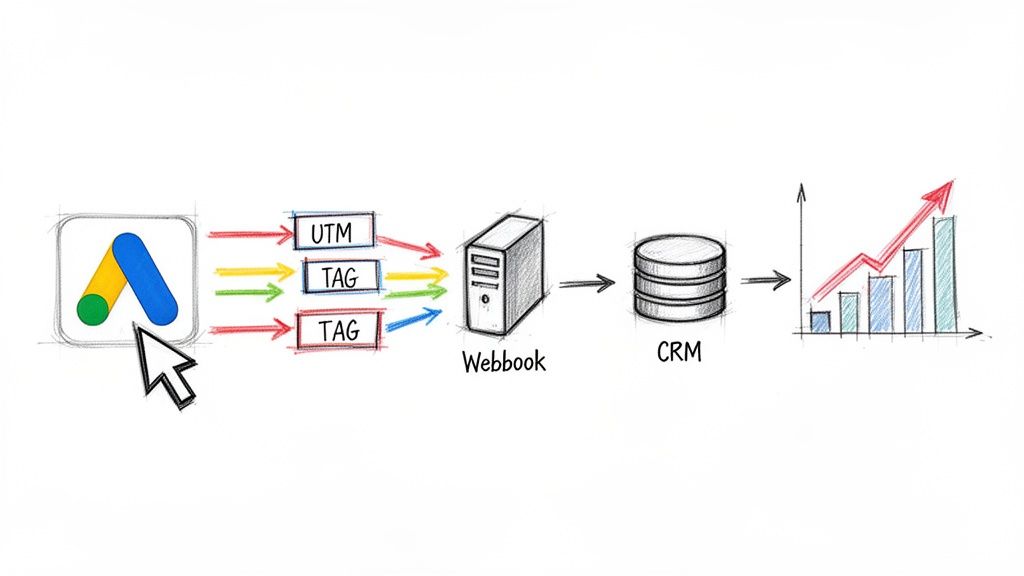
When we talk about PPC ad tracking, we're really talking about connecting the dots. It’s the process of linking a specific user action, like a click on one of your Google Ads, to a meaningful business result—a form submission, a phone call, or, ideally, a final sale.
Effective tracking goes way beyond surface-level vanity metrics like impressions and clicks. It’s about digging into the data that actually demonstrates a tangible return on investment. Frankly, it's the only real way to prove your ad spend is bringing in actual customers within the Google Ads ecosystem.
Why Most PPC Ad Tracking Fails to Deliver Real Insights
Let's get real for a second. We've all seen Google Ads campaigns that pull in tons of clicks but leave clients wondering, "This is great, but where are the customers?" It’s a classic agency headache, and it points to a huge gap between ad activity and real business results.
The problem isn't the clicks. It's the tracking.
Just counting the default conversions in your Google Ads account is a dated strategy that often has you optimizing for all the wrong signals. Real, end-to-end PPC tracking ties every single ad interaction to a concrete outcome, like a qualified lead showing up in your CRM or a finalized purchase in your e-commerce system.
This disconnect between the ad platform and your core business systems is where most tracking efforts fall apart. The funnel is broken, with ad metrics living in one world and your customer data living in another.
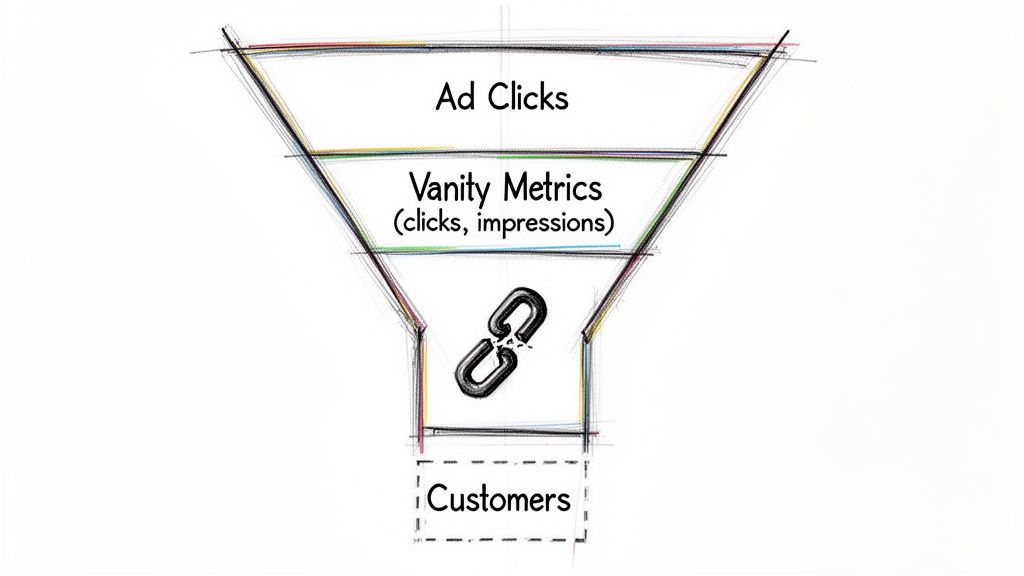
This image perfectly captures the challenge. Without a clear line of sight from click to customer, you’re basically flying blind and can't prove which Google Ads campaigns are truly making it rain.
Moving Beyond Vanity Metrics
This entire guide is built around one core idea: achieving complete visibility in your Google Ads account. We’re moving past the superficial numbers and focusing on the metrics that actually define success. In the world of Google Ads, success isn't just a low cost-per-click; it's a sustainable Cost Per Lead (CPL) and a healthy Conversion Rate (CVR).
To put this in perspective, consider this industry benchmark. In 2025, the average cost per lead on Google Ads across all industries is expected to hit $70.11. That number is up a modest 5.13% from 2024, which suggests competition is starting to level out in some of the bigger markets. For agencies, knowing this CPL is critical for setting realistic client expectations from the get-go. You can find more details in these 2025 Google Ads benchmarks on wordstream.com.
The whole point of robust PPC ad tracking is to teach Google's algorithm what a truly valuable customer looks like. When you can accurately tell it which clicks turned into actual sales, you empower its automated bidding strategies to go out and find more people just like them.
This creates a powerful feedback loop. Better data leads to smarter ad spend, which in turn generates even better data. The rest of this guide will walk you through building a system that proves your value and unlocks smarter optimization, turning your Google Ads budget into a predictable engine for growth.
Building a Bulletproof Tracking Foundation in Google Ads
If you want to track your PPC ads effectively, it all starts with clean, trustworthy data. Without a solid foundation, your entire analytics setup becomes unreliable, which is a surefire way to make bad decisions and waste ad spend. This is where we go beyond the basics and build a resilient system using UTM parameters and tracking tags within the Google Ads ecosystem.
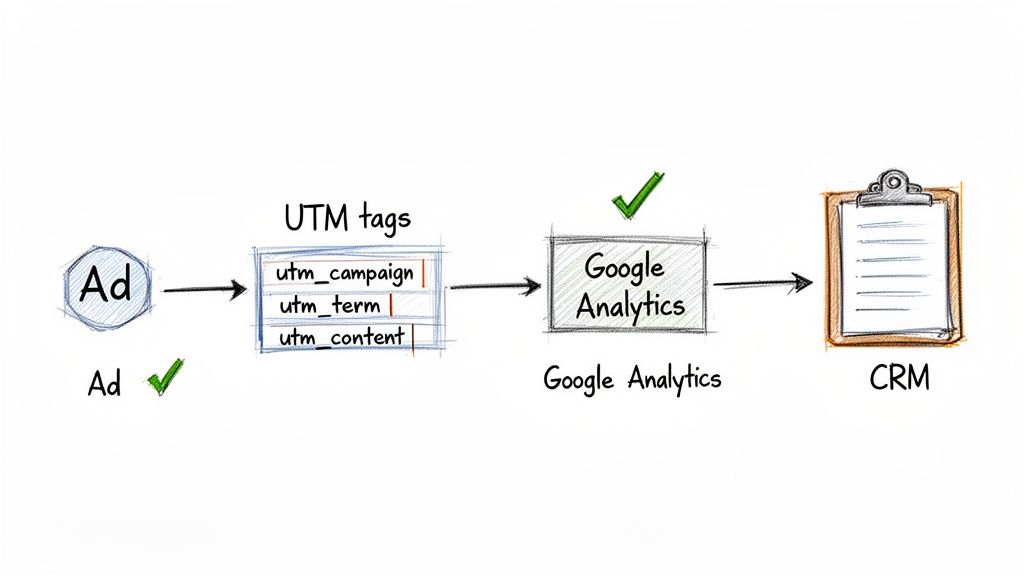
Think of UTMs (Urchin Tracking Modules) as little labels you attach to your ad URLs. They tell Google Analytics exactly where a user came from, preventing your campaign data from turning into a chaotic mess. Honestly, a well-defined UTM strategy is non-negotiable for any serious Google Ads consultant or agency.
Structuring UTMs for Granular Insights
Let's get practical. Imagine you're an agency running a lead generation campaign for a law firm. A generic UTM structure just won't cut it. You need to know which Google ad, keyword, and campaign is driving the leads that actually turn into clients.
This is where a little bit of planning goes a long way. Setting up your UTMs with a clear, consistent structure is key to getting the granular insights you need to optimize your Google Ads.
UTM Parameter Best Practices for Google Ads
To keep your data clean and easy to analyze, it's best to follow a consistent naming convention. Here's a table showing how you might structure your UTMs for a Google Ads campaign, using our law firm example.
| UTM Parameter | Purpose | Example for a Google Ads Campaign |
|---|---|---|
utm_source |
Identifies the traffic source. | google |
utm_medium |
Specifies the marketing medium. | cpc |
utm_campaign |
Names the specific campaign. | personal-injury-nyc |
utm_term |
Tracks the keyword that triggered the ad. | {keyword} (using a ValueTrack parameter) |
utm_content |
Differentiates ads or links within a campaign. | adgroup-car-accident_headline-1 |
Sticking to a template like this ensures that every click is accounted for, making your reports far more powerful. Google Ads' own ValueTrack parameters, like {keyword} or {adgroupid}, are powerful tools that dynamically insert this data, saving you manual effort.
Pro Tip: Adopting a consistent, agency-wide naming convention for UTMs is one of the single most impactful things you can do for data hygiene. It ensures every Google Ads campaign, regardless of who manages it, feeds clean, comparable data into your analytics.
Also, remember that robust data enrichment is a crucial part of the puzzle. Once you capture lead data, enriching it with more details can show you which audience segments are most valuable, taking your insights to a whole new level.
Implementing the Google Tag and Event Snippets
With your UTM strategy mapped out, the next step is getting the right tracking codes on your website. This involves the Google Tag and conversion event snippets, and it’s critical to understand how they work together for effective Google Ads tracking.
The Google Tag (what used to be called the global site tag or gtag.js) is the foundation. You install this piece of code on every single page of your website. Its main job is to create a connection between your site and your Google Ads account, which is what allows you to do things like remarketing and building audience lists.
An event snippet, on the other hand, is a specialist. You place it only on the specific page that marks a conversion—think of a "Thank You" page after someone fills out a form. When a user lands there, the snippet fires and tells Google Ads, "Hey, a conversion just happened!"
This separation is really important. For example, a simple contact form submission might be your standard conversion. But what about something more valuable, like a request for a free consultation? You can create a custom conversion for that action by placing a different event snippet on that specific thank-you page. This lets you tell Google's algorithm to optimize for the higher-value leads, not just any conversion.
Ultimately, this dual-tag approach ensures you’re tracking the actions that actually matter to the business, not just the clicks. And that’s more important than ever. The average click-through rate (CTR) for Google Ads search ads is expected to be around 6.66%, a huge jump from just 1.35% back in 2015. While a high CTR is great, it's the conversion tracking that proves whether that attention is actually turning into revenue.
Closing the Loop on Google Ads Lead Forms
Google’s native lead form extensions are a fantastic way to capture interest right from a Search, YouTube, or Discovery ad. They're great because they remove friction—a potential customer can hand over their details without ever leaving Google. But that convenience can create a massive headache for your PPC ad tracking.
The biggest mistake I see agencies and advertisers make is sticking with manual downloads. Someone has to log into Google Ads, export a CSV file, then upload it into a CRM or email it to the sales team. This creates a critical delay between the moment someone shows interest and the moment your team can actually act on it.
Let's be honest, in lead generation, speed is the only thing that matters. We've all seen the studies: the odds of qualifying a lead plummet after the first hour. A delay of just a few hours can mean the difference between a new customer and a lead who has already moved on.
Relying on a manual process creates a "data black hole." Hot, high-intent leads from your Google Ads just sit there, completely invisible to your sales pipeline, until someone remembers to go pull the list.
Automating Lead Delivery with Webhooks
The solution is to get those leads delivered automatically. This is where webhooks come into play. Think of a webhook as a simple, real-time alert system. The second a user hits "submit" on your Google Ads lead form, a webhook instantly fires off that data to another destination.
Where can you send this data? Pretty much anywhere.
- Your CRM: Automatically create a new contact in Salesforce, HubSpot, or Zoho.
- Your Email Marketing Software: Add the lead to a nurture sequence in Mailchimp or ActiveCampaign.
- A Simple Google Sheet: Pop a new row into a spreadsheet for easy tracking.
- An Email Inbox: Send an instant notification straight to the sales team.
Using a webhook closes the loop between someone seeing your ad and your sales team starting a conversation. No more waiting, no more manual exports, and no more lost leads. The whole thing happens instantly, letting your team engage with people while their interest is at its absolute peak.
This diagram shows how a tool can bridge the gap between a Google lead form and your internal systems.
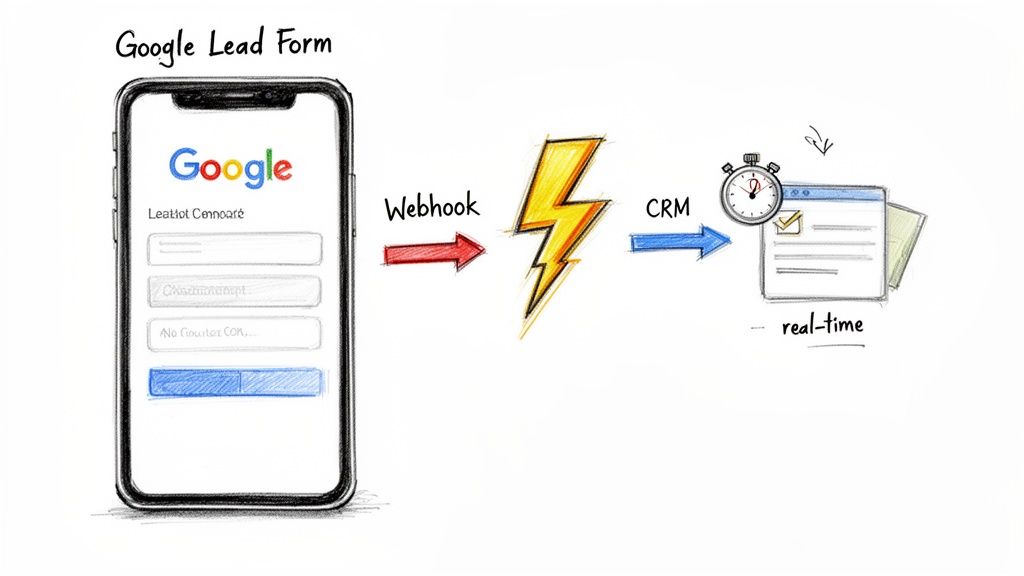
The real magic here is how simple the connection can be. You don't need a team of developers to build some complex, custom solution anymore.
Streamlining the Connection with Third-Party Tools
While you could build a webhook from scratch, that gets technical pretty fast. Luckily, there are plenty of tools out there now that make this process incredibly simple. Platforms like Pushmylead are built for exactly this—they act as the bridge between your Google Ads lead forms and wherever you need that data to go, taking all the technical work off your plate.
With a tool like this, you can usually get the whole integration running in a few minutes without touching a single line of code. You just connect your Google Ads account, pick your destination (like an email address or your CRM), and the tool does the rest. It makes this kind of powerful automation accessible to any advertiser, not just the ones with deep development resources.
Let's walk through a real-world scenario. Imagine you’re running a YouTube campaign that brings in most of its leads overnight while your sales team is offline.
- Without Automation: Those leads sit in the Google Ads UI until 9 AM. By the time someone downloads the list and sends it out, hours have gone by. In that time, the prospect might have already found a competitor or simply forgotten why they filled out the form.
- With Automation: A lead comes in at 2 AM. It's instantly pushed into the CRM, and an email notification is sent. When the sales team walks in, they have a ready-made list of warm leads to call first thing.
This ability to follow up immediately is a total game-changer. It dramatically increases the odds of turning that initial flicker of interest into a real conversation and, hopefully, a new customer. This is how you stop treating lead forms as just an ad feature and start using them as a reliable, real-time engine for your business, making your PPC ad tracking infinitely more valuable.
The ground is shifting under our feet in the world of digital advertising. For years, we've relied on browser-based tracking to measure our Google Ads campaigns, but that foundation is crumbling thanks to privacy updates like Apple's ITP and the impending phase-out of third-party cookies. The agencies and consultants who are winning right now are the ones who have already moved on.
To stay ahead of the curve, we need to look beyond the browser and adopt more durable tracking methods. The two most powerful tools in our arsenal for this new era are server-side tracking and offline conversion imports. These aren't just patches or workarounds; they're fundamental upgrades that build a more accurate and future-proof measurement system for Google Ads.
Making Your Tracking More Resilient with Server-Side Tagging
For as long as most of us can remember, tracking has meant putting a little piece of code—a pixel—on a website. These scripts talk directly from a user's browser to platforms like Google and Meta. The big problem today is that this "client-side" conversation is easily overheard and blocked by ad blockers and new browser privacy settings.
Server-side tracking completely flips this model around.
Instead of the user's browser sending data straight to Google, it first sends that data to your server. Then, your server—which you own and control—forwards that same data to Google Ads. It’s a simple change in routing, but the impact is huge.
- Dramatically Better Data Accuracy: Since the signal is coming from your trusted server, it's far less likely to be dropped or blocked by browser restrictions. This means you get a much fuller, more accurate picture of your conversions.
- You're in the Driver's Seat: You have total control over what data gets collected and where it goes, which is a massive help for staying compliant with strict privacy laws.
- Tighter Security: You can strip out sensitive user information before passing the data along to third-party ad platforms, significantly beefing up your privacy practices.
Think of it this way: client-side tracking is like sending a postcard through the mail. Anyone can read it, and it might get lost. Server-side tracking is like using a secure courier who guarantees the package arrives safely and unopened.
By sending conversion data from a server you control, you create a more direct and reliable communication line with Google Ads. This makes your PPC ad tracking far more resistant to the constant waves of browser and privacy updates.
This improved accuracy is pure gold for Google’s algorithms. When you feed them more reliable data, you get smarter bidding, better campaign performance, and a Google that's much better at finding your next valuable customer.
Connecting Ad Clicks to Real-World Revenue
For so many businesses—especially in B2B, high-ticket retail, or anywhere with a sales team—the most important conversion doesn't happen on a "thank you" page. It happens later, offline, inside a CRM when a lead officially becomes a paying customer. This is where offline conversion imports become an absolute game-changer for Google Ads.
This technique closes the loop once and for all, telling Google Ads not just which clicks generated a lead, but which clicks actually generated revenue.
The whole process hangs on one critical piece of information: the Google Click ID (GCLID). It's a unique ID that Google automatically tacks onto your URL whenever someone clicks an ad.
Here’s a practical workflow for putting this powerful strategy into action:
- Capture the GCLID on Every Lead: Your first job is to make sure your website forms capture and store the GCLID from the URL when a user submits their info. This is usually done by adding a hidden field to your form.
- Send the GCLID to Your CRM: When that new lead gets pushed into your CRM (like Salesforce or HubSpot), make sure the GCLID travels along with the contact's name and email.
- Let the Sales Team Do Their Thing: Your sales team works the lead just like they always do. The GCLID just sits quietly in a field in the contact record, waiting.
- Upload Your Wins to Google Ads: On a regular basis—daily is best, but weekly works too—you'll export a list of GCLIDs for all the leads that have been marked "Closed-Won" or hit another key sales milestone. You then upload this list directly into Google Ads.
This process explicitly tells Google's algorithm, "Hey, these specific ad clicks made my business real money." It is the single most powerful signal you can send. It’s absolutely essential for proving ROI because it draws a straight line from your ad spend to your revenue.
Conversion rates (CVR) in Google Ads averaged 7.52% in 2025, an increase largely driven by smarter targeting. By tracking offline sales, you ensure your reported CVR reflects actual business impact, not just lukewarm interest. You can discover more insights by checking out these Google Ads benchmarks on theedigital.com.
Moving Beyond Last-Click to Prove Full Campaign Value
Capturing conversion data is a huge win, but it only tells you what happened, not why. The real magic in PPC ad tracking is attribution—the art and science of assigning credit to the different marketing touchpoints that guided a customer to a decision. If you skip this, you’re basically flying blind and risk making terrible budget calls based on half the story.
So many agencies and advertisers fall into the trap of using Google Ads' default "last-click" model. It’s a costly mistake. This model gives 100% of the credit to the very last ad someone clicked before converting, completely ignoring every other interaction they had with your brand along the way. This narrow view often leads to cutting budgets for valuable top-of-funnel campaigns because, on paper, they don't look like they're driving conversions.
A Real-World Customer Journey
Think about how people actually buy things. It’s rarely a straight line from seeing one ad to making a purchase. A more realistic path might look something like this:
- Awareness: A potential customer sees your brand for the first time in a YouTube video ad. They don't click, but a seed is planted.
- Consideration: A week later, they're searching for "best CRM for small business" and click on one of your Search ads. They poke around your site but aren't quite ready to pull the trigger.
- Decision: The next day, they’ve made up their mind. They search for your company by name, click your branded Search ad, and finally sign up for a trial.
With last-click attribution, that final branded search ad gets all the glory. An inexperienced analyst might see this and think the YouTube and generic search campaigns are just burning cash. In reality, those campaigns were essential; they introduced the brand and nurtured the lead. Cut their funding, and you’ll likely see your branded search conversions dry up over time.
Comparing Google Ads Attribution Models
To get a true feel for your performance, you have to look at how different models spread the credit. Each one tells a slightly different story about what’s working in your Google Ads account.
Your choice of attribution model directly impacts how you perceive campaign performance. A model that only looks at the end of the journey will cause you to undervalue the critical work of building initial awareness and consideration.
Let's look at how a few of the main models available in Google Ads would assign value in our customer journey example.
| Attribution Model | How It Works | Best For |
|---|---|---|
| Last-Click | Gives 100% credit to the final touchpoint before conversion. | Simplicity, but often misleading. Best for short sales cycles. |
| First-Click | Gives 100% credit to the very first touchpoint in the journey. | Understanding which campaigns are best at generating new leads. |
| Linear | Splits credit equally across all touchpoints. | Valuing every interaction in a long customer journey equally. |
| Data-Driven (DDA) | Uses machine learning to assign credit based on actual impact. | Getting the most accurate, holistic view of campaign performance. |
As you can see, the story changes depending on the lens you use. To really understand what’s going on and prove the full value of your campaigns, you need to implement a multi-touch attribution model that gives you the complete picture.
For most advertisers today, Data-Driven Attribution is the way to go. Because it isn’t based on rigid, predefined rules, it gives you the most nuanced and accurate picture of how your campaigns are working together. Making the switch to DDA helps you make smarter optimization decisions, justify your marketing spend, and show clients the full story of how your work is building a healthy customer pipeline, from the very first impression to the final sale.
An Agency Workflow for Nailing Your Google Ads Tracking Setup
What separates a decent agency from a truly great one? It's the ability to move from scattered tactics to a unified, repeatable strategy. When it comes to PPC tracking, having an ironclad workflow isn't just about being efficient—it's about guaranteeing accuracy and proving your worth from day one.
This blueprint breaks down a complex process into a series of manageable steps you can use for every new Google Ads client you bring on board.
It all starts long before you touch a line of code or open Google Tag Manager. The client kickoff call is your ground zero for discovery. This is where you go beyond surface-level marketing questions and get into the nitty-gritty of their sales process.
You need to know exactly what happens after someone fills out a lead form. Who gets that lead? How fast is the follow-up? What does the full sales cycle look like, from first touch to closed deal?
Understanding this flow is everything because your tracking has to mirror their business reality. If a demo request is worth 10x more than an ebook download, your conversion values need to reflect that. Documenting this entire process creates a single source of truth that aligns your tracking goals with their actual business goals.
The Technical Implementation Checklist
Once you have a clear map of the client's sales funnel, you can dive into the technical setup. This part is all about methodical, step-by-step execution. Using a standardized checklist is the best way to prevent mistakes and ensure you don't miss a critical piece, no matter who on your team is handling the setup.
Here’s a checklist we've refined over the years:
- Universal UTM Template: Start by deploying your agency's standard UTM parameter template. Using a consistent structure—like
utm_campaign={{campaign.name}}andutm_term={{keyword}}—across all your clients makes cross-account analysis and reporting so much easier down the road. - Google Tag & GTM Container: Make sure the Google Tag is installed correctly across the entire site, preferably through Google Tag Manager. This keeps all your tracking scripts in one place and makes future edits a breeze.
- Conversion Action Setup: Build out the specific conversion actions in Google Ads that you identified during the kickoff call. Be sure to define them as "Primary" or "Secondary" based on their real value to the client's business.
- Lead Form Automation: Get real-time lead forwarding set up immediately. A tool like Pushmylead can connect their Google Ads lead forms directly to their CRM or email, which means no more manual CSV downloads and no more stale leads.
- Offline Conversion Foundation: This is a big one. Add a hidden field to their web forms specifically to capture the Google Click ID (GCLID) with every single submission. This is the foundational step you need to implement offline conversion imports later.
A customer’s journey is rarely a straight line. It often involves multiple touchpoints, starting from initial awareness and eventually leading to a final conversion.
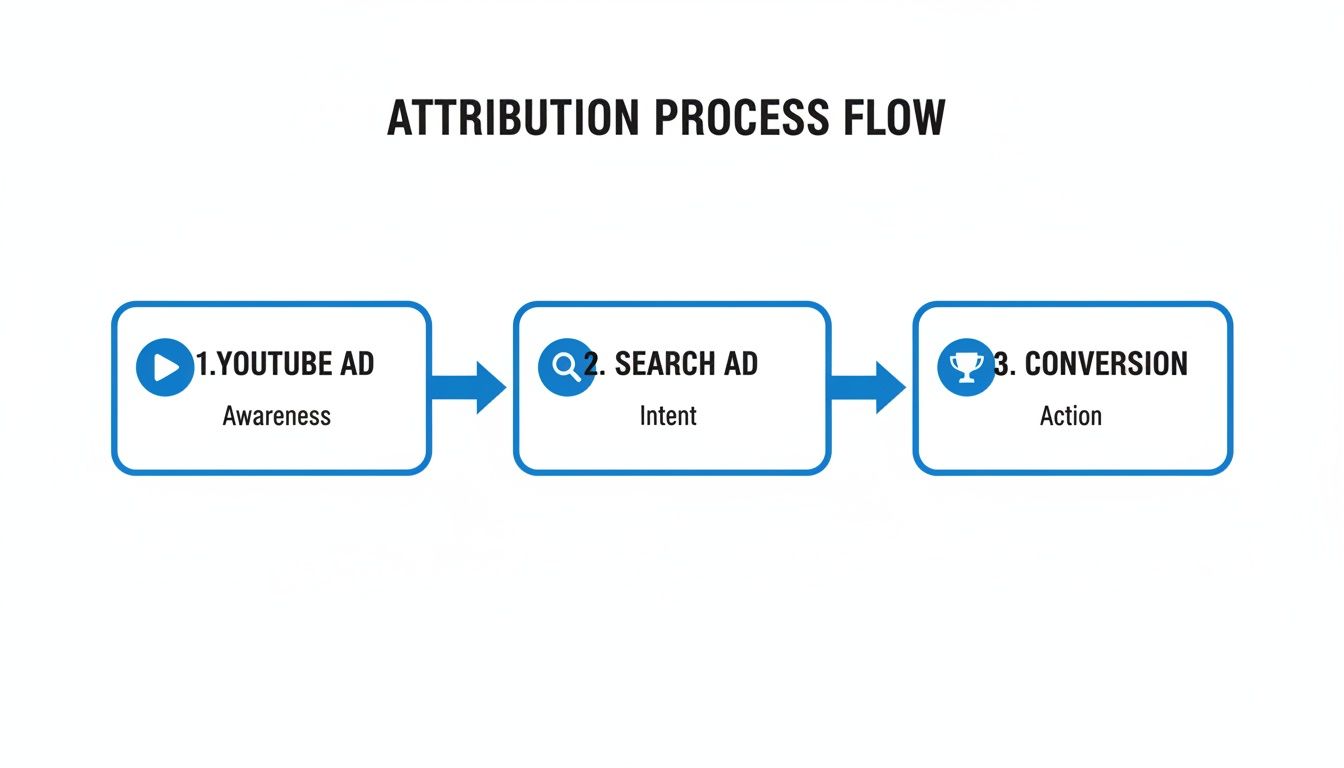
This visual shows how someone might see a YouTube ad, click a search ad days later, and then finally convert. It's a perfect example of why you need a setup that can capture the full, messy journey.
Validation and Proactive Troubleshooting
Your job isn't done once the tags are live. You have to test everything. The validation phase is where you confirm that every gear in your tracking machine is turning correctly. This is absolutely not a "set it and forget it" task.
A tracking setup is only as good as its last test. Never assume a tag is firing just because the platform gives you a green light. Always, always verify it manually to protect your data integrity.
Use Google Tag Assistant or the GTM debug mode to simulate conversions and literally watch the tags fire in real time. Go through the process yourself: submit a test lead from a live ad's landing page. Did it show up in the CRM instantly? Was the GCLID attached? This kind of rigorous testing catches problems before they have a chance to poison your campaign data.
To really take your operations to the next level, create a shared troubleshooting document for your team. This becomes a living "playbook" that catalogues common tracking errors—think cross-domain issues or broken data layers—and their proven solutions. The next time a problem pops up, your team has a go-to resource, which cuts down on wasted time and frustration.
This systemized approach to PPC ad tracking ensures every single Google Ads campaign is built on a foundation of accurate, reliable, and truly actionable data.
Common Google Ads Tracking Questions Answered
Even with the best workflow in place, you're going to have questions. Getting your Google Ads tracking dialed in often means dealing with weird one-off scenarios and really understanding the subtle differences between how various tools measure success.
Let's tackle some of the most common questions I hear from agencies and consultants.
How Often Should I Audit My Tracking Setup?
You absolutely have to do a full, deep-dive audit during client onboarding. No exceptions. After that, I recommend doing another complete audit at least twice a year.
But don't just set it and forget it for six months. A quick monthly spot-check is essential. Make it a habit to confirm your conversion actions are still firing, especially after a client pushes a website update or messes with their CRM.
This kind of consistent check-up stops a small hiccup, like a broken form, from turning into a massive hole in your ppc ad tracking data.
Can I Track Phone Calls from Google Ads?
Yes, and if you aren't, you're flying blind. Google Ads gives you some incredibly powerful, built-in tools for this.
You can, of course, track calls made right from the call extensions in your ads. But the real game-changer is using Google's dynamic number insertion on your website. This feature cleverly swaps out the regular business number with a special Google forwarding number for users who clicked your ad.
This lets you trace that phone call all the way back to the exact campaign, ad group, and even the keyword that triggered it. For any service business—plumbers, lawyers, you name it—a phone call is gold, so tracking them is non-negotiable.
Tracking phone calls closes a massive attribution gap. For so many local businesses, the best leads come from a direct call. If you're not tracking them, you're ignoring a huge piece of the performance puzzle.
What Is the Difference Between a Google Ads Conversion and a Google Analytics Goal?
This one trips up a lot of people. They can both track the same action, like someone filling out a contact form, but they look at who gets the credit very differently.
- A Google Ads Conversion lives and breathes inside the Google Ads platform. By default, it gives 100% of the credit to the very last Google Ad a person clicked. Its main job is to tell you how your ads are doing and feed that data into Google's automated bidding strategies.
- A Google Analytics Goal, on the other hand, gives you the bigger picture. It looks at all your traffic sources—Organic Search, Social, Direct, Email—and lets you see how they work together using different attribution models right inside Google Analytics.
The best approach? Import your most important Google Analytics Goals directly into Google Ads. This way, you can see how your ads play a role in the entire customer journey, not just as the final click. It gives you a much truer sense of your campaign's real impact.
Stop losing hot leads because of manual CSV downloads. Pushmylead gets every single lead from your Google Ads campaigns instantly into your CRM or inbox. This means your sales team can follow up immediately, while the lead is still engaged. Start your free trial at Pushmylead and finally close the loop on your lead generation.