

Negative keywords are your secret weapon for cutting down wasted ad spend in Google Ads. Think of them as a filter, telling Google exactly which searches you don't want your ads to show up for. This simple act of exclusion makes sure your budget is only spent on clicks that matter.
The Hidden Power of Negative Keywords
In Google Ads, it's natural to obsess over the keywords you want to target. But here’s a pro tip: what you choose to exclude is often where the real power lies. As Google's own keyword matching gets broader and more automated, your ability to strategically exclude irrelevant searches is no longer just a minor tweak—it's your most important tool for staying in control.
Your ad budget isn't infinite. Every single dollar you spend on a click that has zero chance of converting is a dollar stolen from a real potential customer. Without a smart negative keyword list, you're practically inviting budget waste.
Imagine you're selling high-end "CRM software." You absolutely don't want to burn through your budget on people searching for "free CRM software" or "CRM software jobs." Those clicks are dead ends.
Negative keywords are the bouncers for your ad budget. They stand at the door and make sure only qualified traffic gets through to your landing pages, which is the key to better leads and a healthier bottom line.
This level of control is more critical than ever. When Google started expanding what "close variants" meant for positive keywords, advertisers lost a lot of their precision targeting. Since 2014, negative keyword match types have been the unsung heroes preventing billions in wasted ad spend.
In a world of fuzzy, "we-think-we-know-what-the-user-meant" positive matching, precise negative keywords are estimated to protect 25-35% of ad budgets globally. If you're interested in the nitty-gritty, you can read more about how keyword matching has evolved and what it means for today's ad strategies.
When you get this right, you can:
- Improve Lead Quality: You stop showing ads to people with the wrong intent, so the only ones who click are the ones actually looking to buy what you sell.
- Increase Profitability: Fewer wasted clicks means your return on ad spend (ROAS) goes up. It’s that simple.
- Enhance Campaign Efficiency: When your traffic is clean, your data is clean. This makes it much easier to see what’s working and make smarter optimizations across your entire account.
How Each Negative Match Type Actually Works
First things first: negative keywords aren't just the opposites of your regular keywords. They play by their own set of rules, and understanding this distinction is key to getting them right in the Google Ads ecosystem. Think of them as specialized filters, each designed to cut out irrelevant search traffic with different levels of precision.
Picking the right filter really boils down to how specific you need to be. As this visual shows, they’re not just a minor tweak; they’re a core part of protecting your budget and keeping your lead quality high.
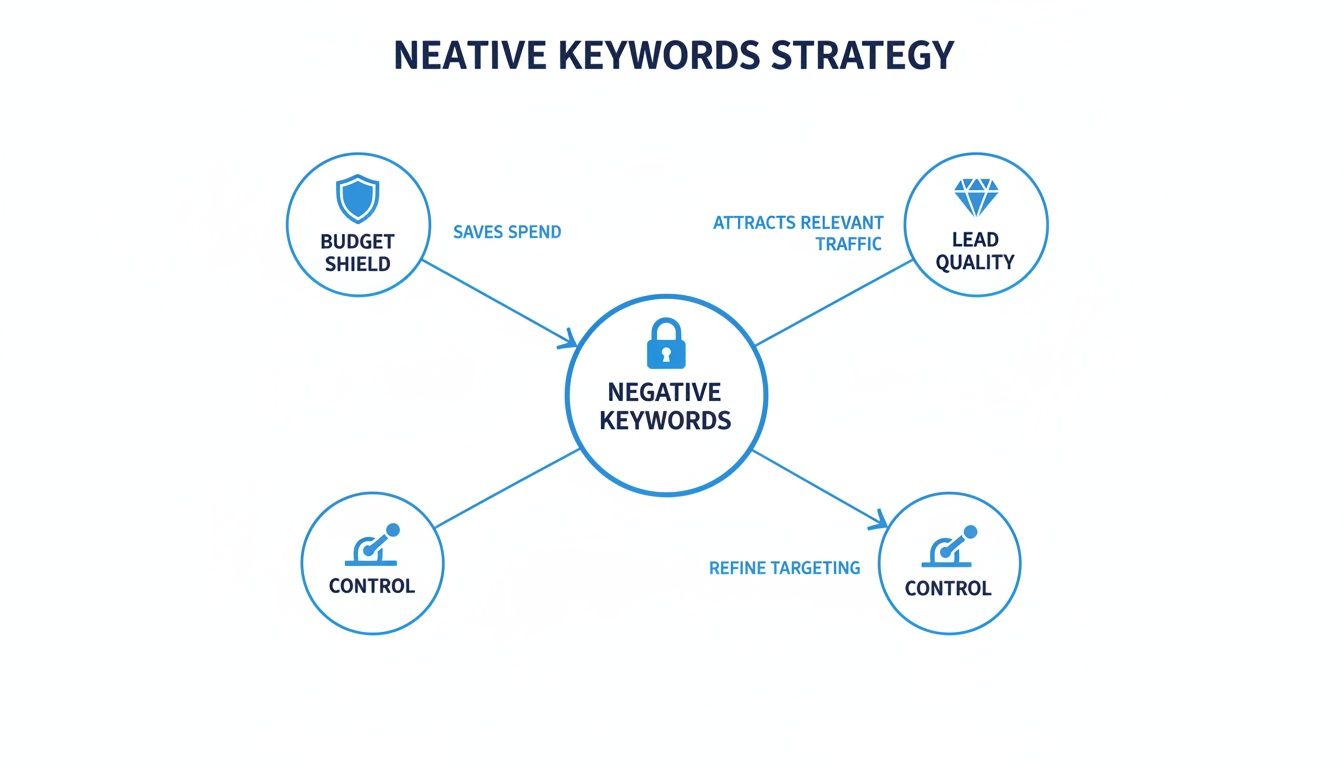
Let's dive in and see exactly how each of these powerful tools works in the real world.
Negative Broad Match: The Sledgehammer
This is your widest, most aggressive filter. A negative broad match keyword stops your ad from showing if a search query contains all the words from your negative keyword, in any order.
Let's say you sell high-end "leather wallets" and want to avoid the DIY crowd. If you add -diy leather wallet as a negative broad match, you’ll successfully block searches like:
- how to diy leather wallet
- leather wallet diy project
- diy my own leather wallet
But here's the catch: your ad could still pop up for "diy wallet" or "leather projects" because those searches don't contain all three of your negative terms. This match type is perfect for knocking out entire concepts where word order doesn't really matter.
Negative Phrase Match: The Scalpel
When you need more control, you reach for negative phrase match. This filter blocks your ad only when someone's search includes your exact negative keyword phrase, in that exact order. Other words can come before or after it, but the core phrase has to be there, untouched.
Imagine you offer "digital marketing services" but are getting flooded with clicks from job seekers. Adding -"digital marketing jobs" as a negative phrase match will stop your ads from showing on searches like:
- entry level digital marketing jobs
- digital marketing jobs near me
- best digital marketing jobs in texas
But it wouldn't block "digital jobs in marketing" because the word order is different. Use this when the specific sequence of words is what defines the intent you want to avoid.
Google Ads Pro Tip: Unlike positive keywords, negative keywords don't match to close variants. If you want to block both "job" and "jobs," you need to add both
-joband-jobsto your negative list. Google won't do it for you.
Negative Exact Match: The Laser
Finally, we have negative exact match, your most surgical tool. It blocks your ad only when the search query is a perfect, character-for-character match to your negative keyword, with absolutely no extra words.
If you add -[free crm software], your ad will only be blocked for the search "free crm software." That's it. It will still show for "free crm software for small business" or "best free crm software."
While you'll use it less often, it’s incredibly useful for pruning out very specific, low-performing search terms that you know for a fact are wasting your money.
Negative Match Type Behavior at a Glance
Sometimes, seeing it all side-by-side makes it click. This table breaks down how each negative match type would handle the same keyword against different searches in a Google Ads campaign.
| User Search Query | Negative Broad: -running shoes | Negative Phrase: -"running shoes" | Negative Exact: -[running shoes] |
|---|---|---|---|
| best running shoes | Blocked | Blocked | Not Blocked |
| running shoes | Blocked | Blocked | Blocked |
| shoes for running | Blocked | Not Blocked | Not Blocked |
| best shoes | Not Blocked | Not Blocked | Not Blocked |
| comfortable running shoes for women | Blocked | Blocked | Not Blocked |
As you can see, the level of control varies dramatically. Choosing the right one depends entirely on how much related traffic you're willing to cut out to eliminate the bad stuff.
Putting Negative Keywords into Practice
Alright, you get the theory behind negative keywords. But knowing the "what" is one thing; turning that knowledge into real-world results in your Google Ads account is a whole different ballgame. Let's move past the concepts and look at how actual businesses use these tools to protect their ad spend and ramp up lead quality.
Think of this as your practical playbook. Effectively implementing negatives is a cornerstone of optimizing Pay Per Click marketing campaigns. It's where your strategy directly translates into savings and stronger performance.
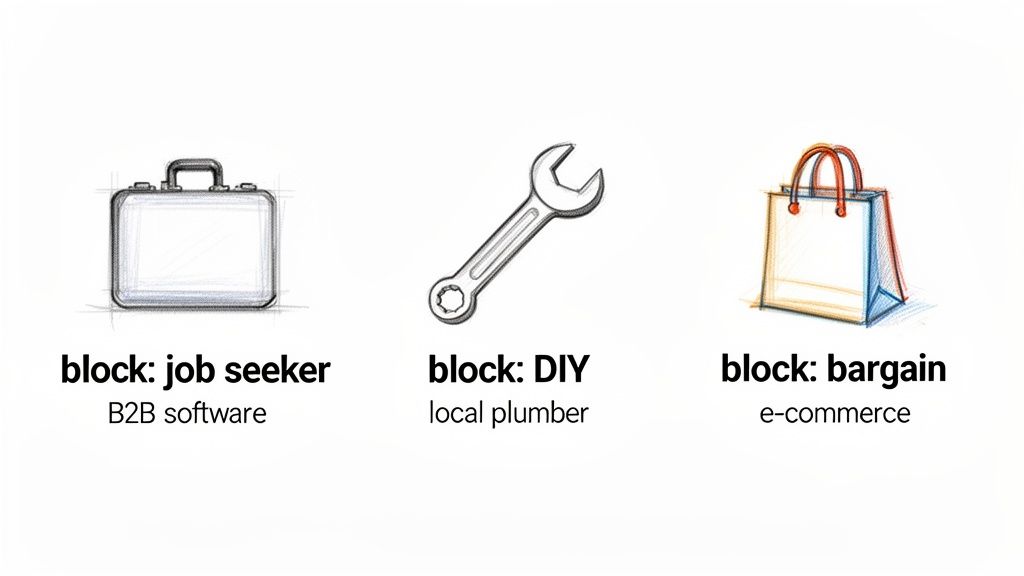
This isn't about guesswork. It’s about surgically removing entire segments of searchers who have zero intention of ever becoming your customers. Let's walk through a few common scenarios.
Scenario 1: The B2B Software Company
Imagine a company that sells premium "project management software." Their budget is getting eaten alive by job seekers and students hunting for free tools. Their target audience is business decision-makers, not someone looking for a new gig or a freebie.
- Problem Queries: "project management software jobs," "free project management software," "project management software certification."
- Strategic Negatives:
-"jobs"-"hiring"-"careers"-"free"-"certification"
- Match Type Choice: Negative phrase match is the perfect tool for this job. Adding
-"jobs"blocks any search containing that word, instantly cutting out a massive chunk of irrelevant traffic. If they used negative broad match, like-free software, they might accidentally block a relevant query like "software for a tax-free organization." Precision is key.
Scenario 2: The Local Plumbing Service
A local plumber offers "emergency plumbing repair" but keeps getting clicks from DIY folks looking for instructions, not a professional. This is a classic problem for service businesses—paying for clicks from people who just want to learn, not buy.
- Problem Queries: "how to fix a leaky pipe," "diy plumbing repair," "plumbing repair videos."
- Strategic Negatives:
-"how to"-"diy"-"videos"-"guide"
- Match Type Choice: Once again, negative phrase match gives them the control they need.
-"how to"is a powerhouse negative that weeds out purely informational searches. It’s precise enough that it won't block a high-intent search like "emergency plumbing repair how much."
By proactively blocking these common budget-wasters, you shift your ad spend from educating the public to attracting paying customers. This simple change can dramatically increase your campaign's return on investment (ROI).
Scenario 3: The E-commerce Shoe Store
An online store sells high-end "running shoes." They need to filter out bargain hunters looking for cheap knockoffs and people researching reviews on other sites. Their brand is built on quality, not discounts.
- Problem Queries: "cheap running shoes," "running shoes reviews," "running shoes vs competitor brand."
- Strategic Negatives:
-"cheap"-"reviews"-"vs"-[walmart]
- Match Type Choice: This situation calls for a mixed approach. Negative phrase match is perfect for terms like
-"cheap"and-"reviews". But for specific competitor names or big-box retailers, a negative exact match like-[walmart]can be useful to block only that precise term, just in case a broader search is still valuable.
Each of these examples gets to the heart of the matter: first, identify the user intent you don’t want, then pick the negative match type that surgically removes it without collateral damage. This is the art and science of smart campaign management.
The Relationship Between Positive and Negative Keywords
Getting a handle on how positive and negative keywords work together can be tricky, but it’s one of the most important concepts in Google Ads. Here’s a simple way to think about it: your positive keywords are the gas pedal, telling Google which searches you want to show up for. Negative keywords are the brakes, giving Google a hard "stop" on specific searches you want to avoid.
It doesn’t matter how perfectly a search term seems to match your positive keyword; if it also triggers a negative keyword, the negative always wins. Your ad will not show. Period. This rule of thumb has become even more critical over the years as Google has taken more liberties with how it matches keywords to search queries.
Why Close Variants Changed Everything
The real shift happened back in August 2014 when Google introduced 'close variant' matching for all exact and phrase match keywords. All of a sudden, our carefully chosen keywords weren't nearly as precise as we thought. One study from around that time found that exact match keywords were matching to 30-50% more search queries than advertisers actually intended, which meant a ton of wasted ad spend on irrelevant clicks.
This trend of broader matching didn't stop there. By 2021, Google had retired the Broad Match Modifier (BMM), which further muddied the waters. Each of these changes put more interpretive power in Google’s hands and took it away from advertisers, making negative keywords our single best tool for clawing back that control.
A positive keyword says, "I'm interested in this general topic." A negative keyword says, "But under no circumstances do I mean this specific thing." The negative keyword is the final authority.
This dynamic is exactly what makes the combination of broad match and negative keywords so powerful. You can cast a wide net with a positive broad match keyword like office furniture to see what kind of relevant, long-tail searches are out there.
Then, you come in with a list of surgical negative keywords to carve away all the junk traffic you don't want. For example:
-"used": This negative phrase match stops you from showing up for anyone looking for second-hand items.-"free": A simple way to filter out people who have no intention of buying anything.-[office furniture assembly]: A negative exact match to block this one specific, non-converting query you've identified.
This approach lets you explore new opportunities and find valuable new keywords without burning your budget on clicks you already know are worthless. This interplay is fundamental. Just as you'd carefully research positive terms on other platforms, like YouTube video keywords, you need to be just as diligent in protecting those investments with a strong negative keyword strategy.
How to Build and Organize Your Negative Keyword Lists
Knowing the match types is one thing, but a truly powerful negative keyword strategy is all about structure. If your approach is messy, you risk blocking good traffic by mistake. Get it right, though, and you’ll have a scalable defense system protecting your ad spend.
Think of it like organizing a library. You wouldn't just toss every book onto a single, massive shelf. You'd categorize them by genre and author to find what you need quickly. The same logic applies in Google Ads—you need different "shelves" for different types of negative keywords.
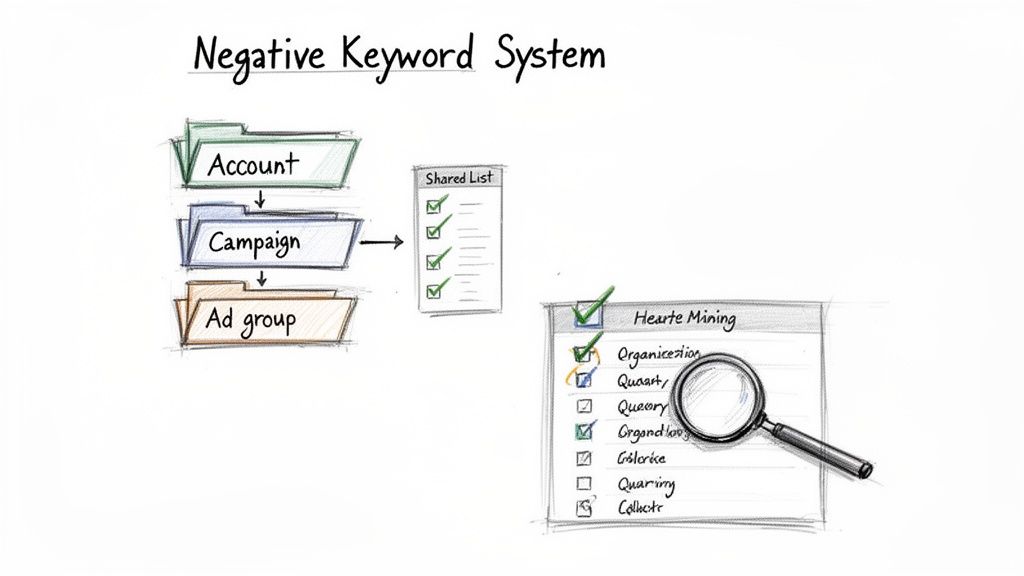
This hierarchy is your blueprint for success. It ensures every negative keyword is doing its job with the right level of precision.
Start with Account-Level Lists
The most efficient way to manage your negatives is with shared negative keyword lists at the account level. This is home base for your universal "stop words"—the terms that are always irrelevant, no matter the campaign.
These lists are perfect for blocking common, budget-draining terms across everything you're advertising. For example, an account-level list is the ideal spot for:
- Universal Irrelevance: Think terms like
"free","jobs","hiring","reviews", and"how to". These are almost always a waste of money if you're not offering those things. - Competitor Names: If you have a strict policy against bidding on competitor brands, adding them to an account-wide list ensures you don't slip up.
- Known Bad Apples: You'll eventually spot search terms that consistently burn money without ever converting. Add them here to banish them for good.
By managing these terms globally, you create a protective foundation for every single campaign you launch. It saves a ton of time and prevents you from making the same mistakes over and over.
Use Campaign and Ad Group Negatives for Precision
While account lists handle the big stuff, campaign and ad group negatives are for surgical strikes. The logic is simple: the more specific the negative, the further down the hierarchy it should go.
Your goal is to apply negatives at the highest level possible without blocking relevant traffic. Start at the account level and move down to the campaign or ad group level only when a negative keyword doesn't apply universally.
-
Campaign-Level Negatives: These are for terms that are irrelevant to one entire campaign but might be perfectly fine in another. For instance, in a campaign for "luxury leather sofas," you'd definitely add
-"cheap"as a negative. But you wouldn't put that on your account list if you also run a campaign for "budget-friendly futons." -
Ad Group-Level Negatives: This is your most granular level of control, and it's fantastic for preventing your own ad groups from competing against each other. Let's say you have one ad group for
"men's leather boots"and another for"men's hiking boots."You’d add-"hiking"to the "leather boots" ad group to make sure the right ad shows for the right search. You can explore a ton of practical negative keywords examples to see how this works in the wild.
A disciplined approach to list management, combined with regular dives into your search terms report, transforms your negative keywords from a simple filter into a powerful tool for sculpting traffic and maximizing ROI.
Common Questions About Negative Keywords
Even with a great strategy in place, you’re bound to run into questions about negative keyword match types while you're in the weeds of managing a Google Ads campaign. Getting these details right is the key to running your negative strategy confidently and avoiding those "oops" moments that cost you money.
Let's clear up some of the most common points of confusion I see pop up all the time.
Can a Negative Keyword Block a Positive Keyword?
Yes, it absolutely can. If there's one rule to burn into your memory, it's this: negative keywords always win. Think of them as the final gatekeeper that can veto any of your positive keyword targeting.
For instance, let's say you're bidding on the positive phrase match keyword "financial software." That makes you eligible for a ton of relevant searches. But the moment you add the negative phrase match keyword -"free", you're telling Google to slam the door shut on any search for free financial software. This override is exactly what makes negatives so powerful for sculpting your traffic and keeping quality high.
What Is the Difference Between Negative Broad and Phrase Match?
The make-or-break difference here is word order. Getting this wrong is a classic way to accidentally block traffic you actually want.
- Negative Broad Match (
-running shoes): This blocks a search if all the words are there, in any order. So, it would block both shoes for running and blue running shoes. It casts a much wider net. - Negative Phrase Match (
-"running shoes"): This is way more specific. It only blocks searches where the words show up in that exact sequence. It would stop an ad for blue running shoes but would not stop an ad for shoes for running.
So, when should you use negative phrase? Use it when the order of the words is what signals the searcher's intent is all wrong for you.
Heads Up: A huge difference from positive keywords is that negatives don't match to close variants. If you want to block both "shoe" and "shoes," you have to add
-shoeand-shoesas two separate negative keywords. Google won't do it for you.
How Often Should I Update My Negative Keyword Lists?
A consistent routine is way more important than a specific frequency, but how often you dig in really depends on how old your campaign is.
For a brand-new campaign, you need to be in that Search Terms Report every 1-2 days for the first couple of weeks. This is your chance to be aggressive and quickly chop out all the obvious budget-wasters right from the start.
Once a campaign is mature and stable, you can relax a bit. A deep dive once a week or every two weeks is usually plenty. The best thing you can do is put a recurring reminder on your calendar. It’s a simple trick, but it's the kind of discipline that protects your ad spend and sharpens your targeting month after month.
Tired of manually downloading leads from your Google Ads campaigns? Pushmylead instantly forwards every new lead from your Google lead form extensions directly to your email inbox. Stop logging in to check for leads and start responding to them faster.