
If you're spending money on Google Ads, you need to be A/B testing your landing pages. It’s that simple. Without it, you’re just throwing money at a wall and hoping some of it sticks. An ab test landing page strategy is your best defense against wasted ad spend.
The whole point is to figure out what actually works. You create two versions of a page—your original (A) and a new variation (B)—then you split your ad traffic between them. The one that gets more conversions wins. This isn't about guesswork; it's about using a scientific method to turn more of your Google Ads clicks into real, paying customers.
Why Your Google Ads Landing Pages Are Leaking Money
Getting someone to click your ad is only the first step. The real test—and where most marketing budgets bleed out—is getting that person to convert once they hit your landing page. So many businesses pour cash into amazing Google Ads campaigns but then send all that expensive traffic to a page that just doesn't work. It’s a massive, costly mistake.
Think about this: the average landing page converts at around 2.35%. But the top 10%? They're converting at over 11.45%. That's a huge gap, and A/B testing is how you close it, directly improving your Google Ads ROI.
This guide is for marketers and agencies who are tired of wasting ad spend. We're going to walk through how to build a smart, data-backed testing process that turns your budget into tangible results.
The flow is pretty straightforward. You drive traffic from your Google Ads campaigns, run the test, and measure which page turns more visitors into leads.
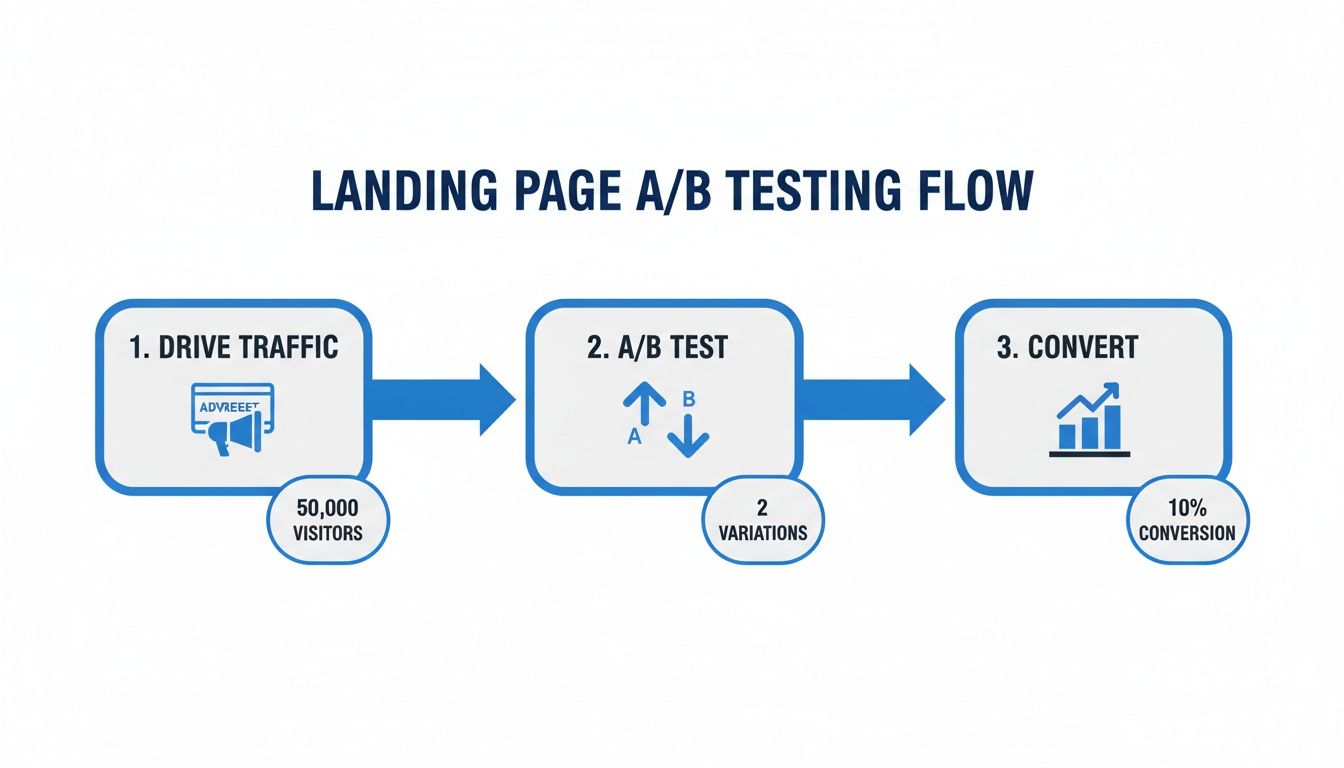
As you can see, the A/B test is the crucial link between your ad spend and your conversions. It’s what makes sure your money is actually working for you.
The Problem with a "Set It and Forget It" Approach
Building a page you think is great and just letting it run is a surefire way to burn through your ad budget. When you don't test, your decisions are based on feelings and assumptions, not hard data. Every single thing on your page, from the headline to the color of your CTA button, is an unproven hypothesis.
An untested landing page is a gamble. A well-tested one is an investment. The goal of an A/B test isn't just to find a "winner" but to gain deep insights into what your Google Ads audience actually wants and what motivates them to act.
A "set it and forget it" mindset leaves so much money on the table. You're likely dealing with one or more of these common issues:
- Message Mismatch: Your ad promises something compelling, but the landing page headline doesn't immediately echo that promise. This creates instant confusion, harms your Quality Score, and causes people to bounce.
- Hidden Friction: There could be something on your page that’s stopping people cold. Maybe the form is too long, the value proposition is weak, or the page is just confusing to navigate.
- Untapped Potential: You'd be amazed at how small tweaks can lead to huge wins. A different headline, a more relatable image, or stronger social proof could be all it takes to double your conversion rate. For more on this, check out our guide on building a high-converting landing page.
Finding Your Winning Hypothesis in Google Ads Data
A great A/B test starts with a strong hypothesis, but that educated guess shouldn't come from a brainstorm session or a random "best practices" article. The most powerful ideas are already waiting for you, buried inside your Google Ads account. Testing button colors is a shot in the dark; analyzing your campaign performance is like having a treasure map.
Your Google Ads data tells a story. It shows you what your audience clicks on, what makes them bounce, and what they expect to see when they hit your page. Digging into this info lets you stop guessing and start making smart predictions about what changes will actually move the needle.
Uncover Clues in Your Ad Groups
Your ad groups are a goldmine. Seriously. Start by looking at the performance of individual ads within the same ad group. Which headlines have the best click-through rate (CTR)? What descriptions drive the most engagement? Your winning ad copy is a massive clue for your landing page.
For instance, if an ad promising "24/7 Emergency Service" crushes the CTR of one focused on "Affordable Rates," that’s your audience telling you exactly what they care about most right now. That winning phrase should be front and center in your landing page headline. This is a classic example of message match, and it's critical for improving landing page experience and your overall Quality Score.
A visitor clicked your ad for a specific reason. If your landing page doesn't immediately deliver on that promise, they're gone. It's that simple.
Analyze Your Device and Audience Segments
Not all traffic is the same. Your Google Ads reports show you exactly how different segments behave. Jump into the "Devices" report and look for major performance gaps between mobile, desktop, and tablet users.
- High Mobile Bounce Rate? If mobile users are bailing way more than desktop users, it’s a huge red flag that your mobile experience is broken. A great test hypothesis could be to simplify the layout, create a bigger, thumb-friendly CTA button, or drastically shorten your lead form.
- Poor Desktop Conversions? On the flip side, maybe desktop users aren't converting. This could mean your page lacks the detail or social proof they expect on a larger screen. You could test adding customer testimonials, a more in-depth service description, or a video demo.
The same logic applies to your audience demographics. If you see that the 25-34 age group is underperforming, it’s a sign your messaging or imagery isn't connecting. A test that swaps out the hero image for something more relatable to that group could be a big winner.
The real goal isn't just to find a winning page; it's to understand why it won. Google Ads data gives you the context you need to build a hypothesis that teaches you something valuable, even if the test itself doesn't win.
Crafting a Powerful Hypothesis
Once you've gathered your clues, it’s time to build a real hypothesis. A weak hypothesis is vague, like, "Changing the button will get more conversions." A strong one is specific, measurable, and has a clear 'why' behind it.
I always use this simple framework: "By [making this specific change], we will [achieve this measurable outcome] because [of this data-backed reason]."
Here’s how that looks in the real world, based on the clues we just talked about:
- Hypothesis 1 (Message Match): "By changing the landing page headline from 'Expert Plumbing Solutions' to 'Your 24/7 Emergency Plumber,' we will increase form submissions by 15% because it directly matches the copy of our top-performing Google Ad."
- Hypothesis 2 (Device Optimization): "By replacing our multi-field form with a single 'Call Now' button on mobile, we will increase mobile leads by 25% because our Google Ads data shows mobile users need immediate help."
- Hypothesis 3 (Audience Targeting): "By featuring images of young families instead of corporate offices, we will decrease the bounce rate for the 25-34 age group by 20% because Google Ads audience data shows this is our core demographic."
This structure forces you to justify every test with data from your Google Ads ecosystem. It transforms your A/B testing from a series of random tweaks into a system for continuous, strategic improvement.
Choosing Your Tools and Launching the Experiment
You’ve got a solid, data-backed hypothesis ready to go. Now it’s time to get your hands dirty and bring this experiment to life. The technical setup can feel a bit daunting, but it’s really just a pre-flight checklist to make sure your test runs smoothly and collects clean data right from the start.
Think of your A/B testing tool as a traffic cop. Its job is to split visitors between your original page (the control) and your new variation, then track which one gets more conversions. For years, Google Optimize was the go-to for this, but it was sunset in September 2023.
The news of its deprecation was a big deal in the PPC world. Google announced it was focusing on integrating A/B testing features directly into Google Analytics 4, encouraging users to explore third-party tools that offer deep GA4 integrations.
Even though the tool itself is gone, the principles behind it are more relevant than ever. Luckily, plenty of great third-party tools have stepped in to fill the void, and they play very nicely with the Google Ads ecosystem.
Selecting the Right A/B Testing Platform
Picking a tool really boils down to your budget, your technical skills, and what you’re trying to accomplish. Some are all-in-one landing page builders with testing baked in, while others are full-blown conversion rate optimization (CRO) platforms.
Here’s my take on some of the most popular options for anyone running Google Ads campaigns:
- Unbounce & Instapage: I often recommend these for marketers who just need to get things done without a developer. They are landing page builders first, which means you can create and test variations incredibly fast with a visual editor. The integrations with Google Ads and Analytics are seamless.
- VWO (Visual Website Optimizer) & Optimizely: These are the heavy hitters. If you’re at an agency or part of a larger team with a serious optimization program, these platforms offer much more advanced testing features like multivariate and multi-page experiments.
- HubSpot: If you're already living in the HubSpot world for your marketing and sales, using its built-in testing tools is a no-brainer. It keeps everything under one roof, connecting your test results directly to lead and customer data.
For most folks running Google Ads, a tool like Unbounce or Instapage is the sweet spot. They offer the perfect mix of power and simplicity.
Configuring Your Experiment for Success
Once you’ve picked your tool and built your new page variation, a few settings need your full attention. Getting these wrong can poison your data and make the whole test worthless.
First up is traffic distribution. For a straightforward A/B test, stick to a 50/50 split. No exceptions. This means half your traffic sees Version A, and the other half sees Version B. It’s the only way to guarantee a fair fight.
Next, you have to tell the tool what a "win" looks like by defining your conversion goals. This should tie directly back to the hypothesis you worked so hard on.
- Hypothesis about getting more sign-ups? Your goal is a successful form submission.
- Trying to boost calls from mobile ads? Your goal is a click on that "Call Now" button.
Your A/B testing tool needs to know exactly what success looks like. Define one primary conversion goal that proves or disproves your hypothesis. You can track secondary metrics like scroll depth, but the winner is always decided by that primary goal.
Ensuring Your Data Flows Correctly
This is where I see people stumble most often, and it's the absolute most critical part of the setup. Your test results are meaningless if they live in a silo, disconnected from Google Analytics and Google Ads.
You need to make sure two key connections are solid:
- Connect to Google Analytics: Your testing platform must send its data over to Google Analytics 4. This is how you’ll be able to slice and dice the results later by campaign, ad group, or device. Most tools handle this by sending a custom event to GA4 that identifies the experiment and which variation the user saw.
- Pass Data Back to Google Ads: It is essential that conversions from both page variations are reported back to Google Ads. If this connection is broken, Google’s smart bidding algorithms will be flying blind. You need to configure your conversion tracking so that a form fill on the control page and a form fill on the variation are both counted as conversions in your Google Ads account.
Neglecting this step is a classic mistake. You might find a winner in your A/B testing tool, but if Google Ads can't see those conversions, its automated bidding (like Target CPA or Maximize Conversions) can't learn from them. The whole point is to create a closed loop where your testing insights are directly fueling your campaign optimization.
How to Analyze Results and Find a Real Winner
Your test is live, traffic is flowing, and the data is trickling in. I know how tempting it is to peek at the results every few hours, ready to call it the second one version pulls ahead.
Resist that urge. Seriously. It's one of the most common—and most expensive—mistakes you can make.
Declaring a winner too early, before you have enough data, is like calling a football game after the first touchdown. Real analysis takes patience and a solid grasp of a few key ideas. Without them, you’re just guessing again.
Statistical Significance Is Non-Negotiable
If you only take one thing away from this section, let it be statistical significance. In simple terms, this is the mathematical proof that your results aren’t just a random fluke. It’s a measure of confidence that the difference you’re seeing is real and caused by your changes, not just luck.
Think of it like this: if you flip a coin ten times and get seven heads, you might think it's a lucky coin. But if you flip it a thousand times and get 700 heads, you know something is up. That’s statistical significance in a nutshell.
The industry-standard goalpost is a 95% statistical significance level. This means there's only a 5% chance the result is random noise. If your testing tool says you've only hit 80% significance, the results are way too shaky to trust.
Most A/B testing platforms like Unbounce or the now-retired Google Optimize calculated this for you, often calling it a "confidence level" or "chance to beat original." You have to wait until that number hits 95% or higher before even thinking about making a final call.
Your Post-Test Analysis Checklist
Once you've hit that magic 95% confidence level, it's time to actually dig in. A winning test isn’t just about one number going up; it’s about understanding the full story behind the data.
Here's the checklist I run through every single time:
- Did it hit the primary goal? Go back to your hypothesis. If your goal was to increase form submissions, that is the only metric that can crown the winner. Don't get distracted by anything else.
- What are the secondary metrics saying? Now, look for the ripple effects. How did the change affect time on page, bounce rate, or scroll depth? Sometimes, a variation boosts conversions but kills engagement—a crucial insight for next time.
- Segment, segment, segment. This is where the gold is buried. Filter your results by traffic source (like a specific Google Ads campaign), device type, or new vs. returning users. You might find your new page is a massive hit on mobile but actually performs worse on desktop. That's not a simple win; it's a strategic directive.
- What's the financial impact? Connect the dots back to your Google Ads account. Calculate the cost per lead (CPL) or cost per acquisition (CPA) for each variation. A page with a slightly lower conversion rate but a much higher lead quality could be the real winner for the business's bottom line.
What to Do with Inconclusive Results
Sooner or later, you'll run a test that ends in a shrug. You let it run for weeks, collect plenty of data, and… nothing. The two versions perform almost identically.
This is not a failure. It’s a finding.
An inconclusive result tells you that the specific element you changed did not have a meaningful impact on user behavior. That's incredibly useful information. It means you can stop wasting time and energy on that idea and move on to a bolder, more impactful hypothesis.
If changing your button from blue to green did nothing, you've just learned button color isn't a key driver for your audience. Now you can focus your next test on rewriting the entire value proposition—something that actually matters.
Even a "Failed" Test Is a Win
And what about when your new variation gets absolutely destroyed by the original?
Pop the champagne. I'm serious.
You just discovered something vital about your audience without having to permanently roll out a change that would have torched your Google Ads performance.
Every test, win or lose, is a lesson. A losing test proves a hypothesis was wrong, and that is an invaluable piece of data. It forces you to get closer to what your customers actually want, not just what you think they want. Document these learnings meticulously. Over time, this internal knowledge base becomes your most powerful asset, helping you build smarter campaigns from day one.
Common A/B Testing Mistakes That Can Tank Your Results
You can run a technically perfect landing page experiment, but a few simple, common errors can make the results completely useless. These aren't just minor slip-ups; they're traps that can lead you to make costly decisions based on bad data, hurting both your client relationships and your Google Ads performance.
Running a successful test isn't just about finding a winner. It's about making sure that win is real and repeatable. The good news is that these classic pitfalls are surprisingly easy to avoid once you know what to look for.
Testing Too Many Things at Once
This is the number one mistake I see people make. You get excited about optimization and decide to change the headline, the hero image, the CTA button color, and the form layout all in one go. When the test ends, you might have a winner, but you have absolutely no idea why it won.
Was it the punchier headline? Or was it simplifying the form? You’ll never know for sure.
If you want truly actionable insights, you have to test one significant variable at a time. If you have a hypothesis about your headline, then only the headline should change. If you think form length is the problem, just test the form. This kind of discipline is what separates a lucky guess from a real, repeatable insight.
Stopping the Test Too Early
Patience is a superpower in A/B testing. It's incredibly tempting to see one variation pull ahead by 15% after just a couple of days and call the race. Don't do it. Early results are often just noise, driven by random fluctuations in traffic and user behavior.
Before you even think about stopping a test, you need to hit a few key milestones:
- Reach statistical significance: This is non-negotiable. Always aim for a confidence level of at least 95%.
- Complete a full business cycle: Let the test run for at least one full week, but two is even better. This smooths out any weirdness between weekday and weekend traffic patterns.
- Get a decent sample size: Each variation needs enough conversions to be trustworthy. A test with only five conversions per side is basically a coin flip, even if the confidence level looks high.
Calling a test early is the fastest way to get a "false positive"—a result that looks like a win but was really just random chance. You could easily roll out a "winner" that actually ends up hurting conversions in the long run.
Ignoring What's Happening Outside the Test
Your A/B test doesn't exist in a bubble. The world outside your landing page can throw your results for a loop. Imagine running a test for an e-commerce client right in the middle of a Black Friday sale. Your conversion rates will be through the roof on both versions, making it impossible to tell if your changes actually made a difference.
Before you launch any experiment, take a moment and ask:
- Are there any major holidays or big sales events happening?
- Is a new PR campaign or viral social media post sending a flood of unusual traffic?
- Did we just make a massive change to our Google Ads targeting, budget, or bidding strategy?
If the answer is yes, you should probably wait until things calm down. Ignoring these outside events can invalidate an otherwise perfect test, leaving you with a pile of confusing and unreliable data. A controlled environment is key, and that means being aware of everything that might influence your visitors.
Remember, research shows that only about one in eight A/-B tests produces a significant result, but the ones that do can lead to massive improvements. That's because proper testing methodically connects your ideas to real data, allowing you to refine the user experience without taking huge risks. For more on this, you can check out some great insights on the impact of consistent testing from the experts at Leadpages.
Building a Culture of Continuous Optimization
Don't stop after just one A/B test. A single win feels great, but the real power comes from building a system—a true optimization engine—that constantly churns out better results for your Google Ads campaigns.
This is about shifting from one-off tweaks to a long-term, proactive strategy. Every experiment you run, win or lose, adds another piece to the puzzle. Over time, that accumulated knowledge becomes your secret weapon, helping you test smarter, not just harder.

Creating a Testing Knowledge Base
The first, most critical habit to build is documenting everything. Seriously, everything. A test's value doesn't just evaporate once you pick a winner. The insights are pure gold, especially when shared across your team or agency.
Get a central repository going. It doesn't have to be fancy—a simple spreadsheet or a shared project in your management tool is perfect. For every ab test landing page you run, make sure you log:
- The Hypothesis: What did you change, and what did you expect to happen based on your Google Ads data?
- The Results: Don't just put "B won." Capture the key metrics, conversion rates, and the statistical significance.
- The Learnings: This is the most important part. What did you actually learn about your audience from this?
This simple log stops you from rerunning tests that already failed and gets new team members up to speed on what actually moves the needle for your customers.
Building a Prioritized Testing Roadmap
Once you have a system for capturing what you learn, you can start building a strategic roadmap for what to test next. No more chasing shiny new ideas. Instead, you can prioritize experiments based on their potential impact versus the effort they'll take. A simple scoring framework can work wonders here.
The goal is to create a culture where testing isn't just an occasional project—it's the default way you make any significant change. This is how you prove ongoing value to clients and turn your Google Ads spend into a real performance-driver.
It's amazing how few companies actually do this. Only about 17% of marketers are consistently using A/B testing on their landing pages. That's a huge opportunity left on the table, especially when we know personalized CTAs can convert 202% better than generic ones, and adding a video can boost conversions by 86%.
When you build a testing culture, you gain a massive edge. To really get this engine humming, it helps to zoom out and master the bigger picture of A/B testing marketing strategies that win customers.
FAQs: Your A/B Testing Questions Answered
Even the pros have questions when it comes to A/B testing landing pages. Running a clean experiment is what separates a lucky break from a genuinely powerful insight. Let's tackle some of the most common questions I hear.
How Long Do I Need to Run My Landing Page Test?
Forget the clock. Your real goal is statistical significance.
As a baseline, I always recommend running a test for at least two full business weeks. This helps smooth out the weird traffic spikes and dips that happen day-to-day. The main goal is to get enough data for each variation to hit a 95% confidence level, so you know the result isn't just a fluke.
Can I Test a Landing Page That Doesn't Get Much Traffic?
Absolutely, but you have to change your strategy. With low traffic, it will take forever to see a clear winner if you're just tweaking button colors. So, you need to go big.
- Try a completely different value proposition.
- Overhaul the layout entirely.
- Swap your standard form for a multi-step quiz.
Massive changes like these are much more likely to create a significant lift you can actually measure, even with a smaller sample size.
On a low-traffic page, you have to swing for the fences. Don't waste your time on small tweaks. Test a radical redesign that completely challenges your assumptions about what users want.
What's the Difference Between A/B and Multivariate Testing?
It's actually pretty simple.
A/B testing is a head-to-head competition: Version A vs. Version B. It’s perfect for testing big, bold changes where you want a clear winner.
Multivariate testing, on the other hand, is like a mini-tournament. It tests multiple combinations of smaller elements at once (e.g., headline A with button A, headline A with button B, headline B with button A, etc.) to find the perfect mix.
Use A/B tests for major overhauls and multivariate tests for fine-tuning specific elements on pages that already get a ton of traffic.
At Pushmylead, we help you act on your conversions faster. Get your Google Ads leads sent directly to your inbox the moment they come in. Stop downloading CSVs and start converting leads instantly. Learn more at https://www.pushmylead.com.